Practice that prepares you—
not just keeps you busy.
AI-powered OSCE cases with standardised patients, structured feedback across five clinical domains, and a Knowledge Bridge after every encounter. Designed by clinicians, scored out of 100, and adaptable to your training level and specialty.
OSCE prep is hard for reasons that have nothing to do with how much you know.
Real OSCE practice requires standardised patients, calibrated scoring, and consistent feedback. Most candidates get none of these. Plexus solves all three.
No one to practise with
Study partners are inconsistent, role-play groups are scarce, and clinical teachers don't have time for individual feedback. You end up rehearsing in your head, hoping it's enough.
Feedback that doesn't sting
Peer review is kind but vague. The feedback you actually need — what an examiner would mark you down for, why a missed red flag matters — is uncomfortable to give and rarely landed.
No way to know if you're ready
You finish a mock exam feeling fine, or panicked. Neither is a signal. Without consistent scoring across many attempts, you can't tell whether you're improving or trending the wrong way.
Three steps. Every case.
Choose a station in your specialization, run the consultation with an AI standardised patient, and get a Knowledge Bridge — a structured post-exam review.
Drive the consultation. We respond as the patient.
Each case opens with a patient brief and supporting materials — X-rays, ECGs, photographs and documents where relevant. You lead the consultation, typing as you would speak. The AI patient responds in character with realistic affect, history, and answers grounded in the case.
Out of 100. Across five domains. Every time.
When you finish, the AI scores you against the OSCE rubric: clinical reasoning, safety, professionalism, communication, and structure & organisation. Each domain is rated out of 100 and weighted by your level, with explicit rationale for the score awarded.
The Knowledge Bridge turns a number into learning.
Every exam — pass or fail — generates a Knowledge Bridge: an active learning layer with the ideal answer framework, strengths to keep, missed key points, and a targeted reflective prompt. It's the difference between getting marked and getting better.
One product, screen by screen.
A complete walkthrough of the simulator as a candidate meets it — from creating an account to the Knowledge Bridge you read once the encounter has been marked.
Exam chat
The hero workflow. The candidate types a consultation with an AI standardised patient while the case materials sidebar shows the brief, persona and supporting imagery. Until the minimum number of exchanges is reached, Finish shows how many more are needed.
- AI patient stays in character; never breaks role-play or hints
- Progressive disclosure of withheld facts, and a jargon watch-list per station
- Materials sidebar on desktop; slides in as a drawer on mobile
- Cancel at any time; resume an in-progress case from the dashboard
Knowledge Bridge
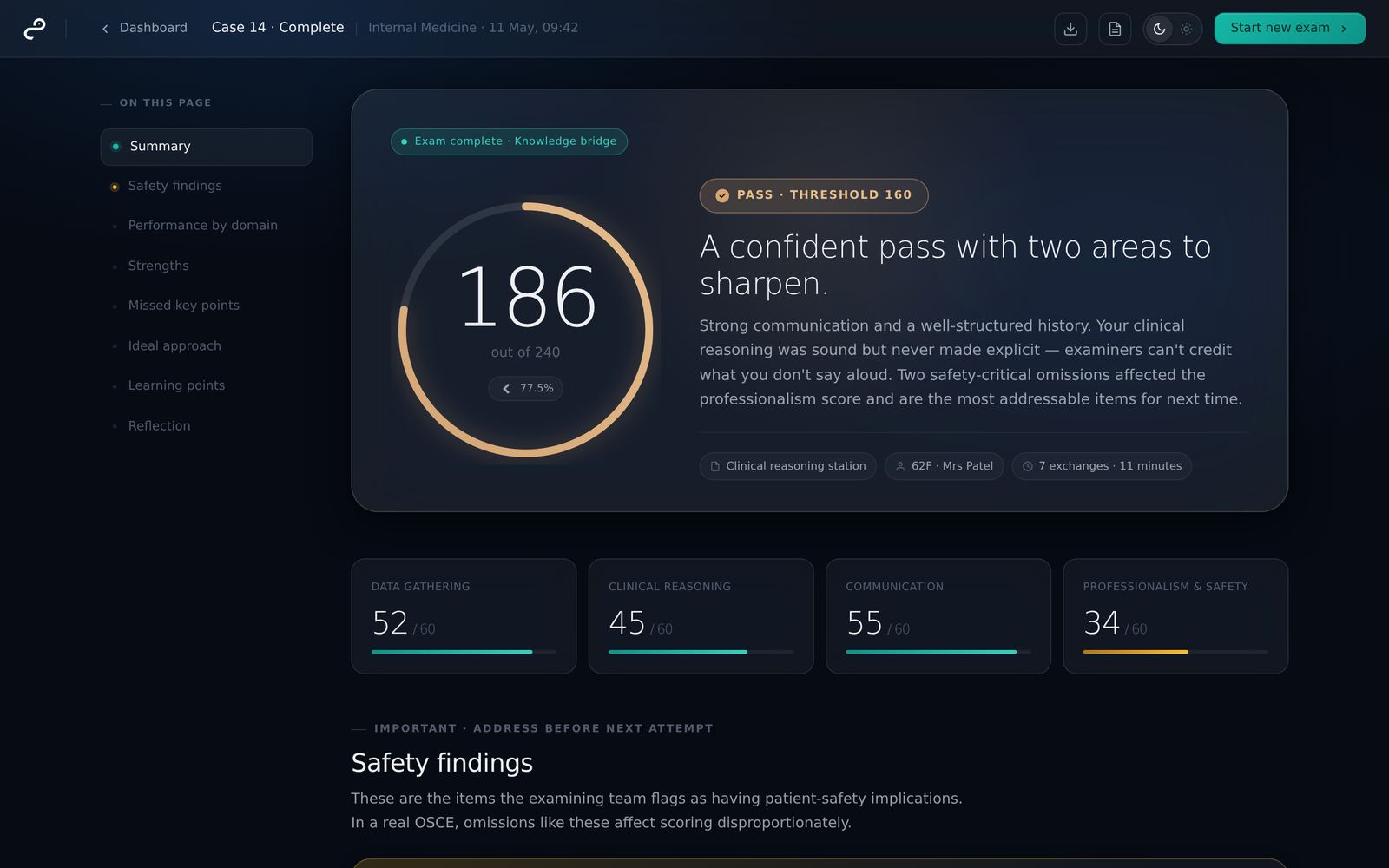
The post-exam learning layer. Score out of 100 with pass-mark indicator, five-domain breakdown weighted by level with explicit rationale, safety findings called out separately, then strengths, missed points, ideal-answer framework, and a targeted reflective prompt.
- Score ring with a configurable percentage pass threshold (default 65%)
- Domain bars sum to total; reasoning is reproducible from the transcript
- Safety-critical omissions surface above the fold — they matter most
- Reflection prompt forces active processing, not passive reading
Dashboard
The candidate home page. Plain figures from recent attempts, your ongoing exams, score trajectory across recent cases, and quick access to start a new exam or review past Knowledge Bridges.
- Passes in the last five, average and best score — figures, not a verdict
- When a limit on open exams is set, a counter shows how many are in use
- Score trajectory shows direction of travel — improvement is the real metric
- First-time and populated states designed; smooth onboarding
Sign in & sign up
Passwordless authentication with a 6-digit code sent by email. Same flow for sign-up and sign-in — toggle between modes at the top. Specialisation picker shown on first account creation only.
- No passwords to set, store, forget, or reset
- The code expires after 10 minutes and works once; a wrong or expired code says which
- Read the code on any device, type or paste it here, and you're in
- Brand panel on the left builds confidence before the email field
Profile & history
Account management plus the candidate's full exam history. Sub-tabs separate exam sessions from sign-in activity. A blocking overlay protects against accidental specialisation changes — switching tracks resets KPIs.
- Edit name and email; a new email address is confirmed from its own inbox
- Specialisation change overlay — destructive action gated by explicit consent
- Exam history with passes, fails, cancellations, and full session detail
- Sign-in activity lists every sign-in and sign-out
Everything an exam-ready candidate needs.
A modern, focused environment for repeated practice — without timers, distractions, or theatre. Just the parts of OSCE prep that actually move your score.
Standardised-patient chat
The AI plays the patient — staying in character, withholding information until you ask, responding with realistic affect. No leading questions, no breaking role-play.
Rubric-based scoring
Versioned scoring prompts, five-domain rubric, and a configurable pass threshold your programme can set. Every score is reproducible from the transcript.
Safety-critical feedback
Missed red flags, unsafe decisions, and critical omissions are flagged explicitly. Patient-safety items influence the safety domain disproportionately.
Progress you can see
Your scores, passes and trend across recent cases, as plain figures — attempts, average and best score — with no verdict attached.
Exam mode and tutor mode
Sit a case as a silent exam, scored like the real thing, or in tutor mode with Socratic coaching at natural pauses. Same patient, same case.
Case materials in the encounter
X-rays, ECGs, photographs and documents attached per station, shown in a sidebar beside the consultation. Read-only afterwards, so you can review what you were working from.
Pick your track. More on the way.
Choose the specialization aligned to your finals. The case library, station mix, and rubric are calibrated per track. Switch tracks any time — your history is preserved.
What you actually see after an exam.
A real Knowledge Bridge from a chest-pain station: domain breakdown, safety findings, strengths, missed key points, and an ideal-answer framework. This is what you cross to learn from each case.
Built for phones, too.
The chat interface adapts to your device. Materials slide in as a drawer on mobile so you never lose the briefing or the X-ray while typing. Sign-in is passwordless — a 6-digit code by email.
Your first case is minutes away.
Sign in with a 6-digit code by email, no password, pick your specialization, and start your first consultation with an AI standardised patient — scored out of 100, with a Knowledge Bridge at the end.